Tricks5

  • Home
  • Referral Code
  • Technology
You are here: Home / Archives for Uncategorized

HeyCare App 100rs Per Referral + 50rs Signup Download Now(Working)

June 23, 2017 by Tricks5 Leave a Comment

HeyCare App 100rs Per Referral

Update: App is working fine Now no issues.
Update: Currently Showing Some error will be updating As soon as problem solved

Hey are app one app which takes care of all our health, pill reminder and more. Make orders from the wallet and get exciting discounts from various medical stores and can purchase medicines from all the great cities, upload prescriptions. And much more want to get a free coffee day credit check now.

Currently Running offer Pay with a wallet and get 30% off On all Products.
heycare

Here you can find some cities


Get free 50rs Signup Bonus from HeyCare:

1.Get Hey are app from (Heycareapp) Play store

Download to Get Free 50 wallet

2.Skip all instructions that are available.

4. Now Click on the Right side menu and Click on Login.

5. At the top right, you can find Signup button click on it to open signup form.

6. Enter your Mobile, Password, Email and referral code and click on signup.

7. Enter Refer Code As    you must enter this code to get free 50rs wallet balance  code is  9HMROA

Referral ID is 9HMROA

Note: Referral credit will get only after first order delivery of your friend.

8. Now you get an OTP to your mobile number (Creates wallet on the same number) verify using OTP

9. After successful verification, you will get Free 50rs which added to your wallet

Get Grammarly Premium Free

10. Make friends join using your referral id and give free money to them.

11. In Dashboard check for wellness products and order any product below 50rs.

Here you can find some cities 

heycarecities


HeyCareRefer and earn:

Make money with Mobile

You can make unlimited money by referring your friends; it is paying 100rs per successful referral.

Use Refer code to get Free 50 wallet credit:   9HMROA

Final words:

Transfer wallet credits to friends and receives from them, so it is very easy to send wallet credit and useful to reduce bills. Refer many friends to earn Much money.

Tricks5
Tricks5

I am Very Enthusiastic about Writing Tech, Smart Phones, Products Reviews, Offers, and deals. I have been writing on tricks5.com since 2015.

tricks5.com

Filed Under: Uncategorized

Unsubscribe all Gmail subscriptions at once

June 23, 2017 by Tricks5 Leave a Comment

Unsubscribe all mails atonce :

It’s an easy online tool that you can simply unsubscribe unwanted subscription in gmail with just one click. If you are facing to getting lot of more with junk emails and spams this is the only tool that gives you access to unsubscribe in one single click.

You can unsubscribe in a simple three steps

  1. To do this go their website www.unroll.me
  2. And Give Access to Manage your Gmail contacts.
  3. Identify your subscription email. and then click Unsubscribe

By Doing this Simple three steps, you can escape getting rid of junk emails. Now your inbox is free of junk emails. I will Show you in detail how can you do this.

  • First thing you have to their website www.unroll.me
  • Next Step is to click on the get started button as shown in below image.
  • Enter your email address which Gmail subscriptions do you want to delete it. And then click on the Terms and Privacy Policy to agree their rules and regulations. If you want to know it click on the terms and privacy policy read carefully their terms.

Unsubscribe gmail

  • Unroll me request for permission to make changes on your browser. Click the button allow to go on the next step.

Unsubscribe gmail

  • You will get the new page with details with what you have subscribed with. You need to just unsubscribe all the stuff you dont want.Unsubscribe

Conclusion:

Yes we can bw away  from all gmail  subscriptions at once. usually we subscribe for getting newsletters or emails from a company. but when we unsubscribe our email will be deleted from their database so there is no question of getting emials from a website untill you rejoin or subscribe again. hope it will be usefull and time saving method . Do comments for your queries and to update post with new information.

Tricks5
Tricks5

I am Very Enthusiastic about Writing Tech, Smart Phones, Products Reviews, Offers, and deals. I have been writing on tricks5.com since 2015.

tricks5.com

Filed Under: Uncategorized

Nokia Secret Codes Know more

June 22, 2017 by Tricks5 Leave a Comment

Many of us first mobile is Nokia but few of us know about nokia secret codes yes there are many nokia secret codes with which we can know information.we are listing most of them they are useful.I’m showing you the important Nokia secret codes that will help to know phone information and Unlock your NOKIA phone if it is at risk.

Warning: We are not responsible for any Damaging for your mobile phone. Trying these Nokia secret codes only at your own risk.

List of  Nokia secret codes :

  • *#06#

This code used to check IMEI of your Mobile. also it works fine

You can use this code in andoid mobile and it work fine


  • *#7760#nokia secret codes

This code helps to look at the factory or the factory code


  • *#7780#

This code for “Reset factory Settings”


  • *#67705646#

This Code will clear the LCD display

  • *#0000# or   *#9999#

This code is used to view Software Version and release date of your phone. If this code doesn’t work use another code

[Read more…]

Tricks5
Tricks5

I am Very Enthusiastic about Writing Tech, Smart Phones, Products Reviews, Offers, and deals. I have been writing on tricks5.com since 2015.

tricks5.com

Filed Under: Uncategorized

If someone blocks me on Whatsapp unblock myself ???

June 22, 2017 by Tricks5 5 Comments

Unblock Yourself if someone blocked your WhatsApp Account(Not working now):

If you blocked on WhatsApp by your friend for some other reason & you, want to unblock yourself to text them again without letting him or her know so, you are at right place.It discusses WhatsApp unblock myself.

Then there are some methods by which you can easily unblock yourself from anyone’s WhatsApp account & there are many ways to get free internet using VPN try for Airtel with Droid VPN.

I have tried both the methods and currently sharing an easy process to unblock we well update other processes as early as possible.whatsapp unblock myself

Whatsapp unblock Myself  Method:

  1. Open WhatsApp on your mobile or blue stacks or other emulators
  2. Go to settings in device
  3. then go to and find deactivate the account
  4. Now Enter your mobile  number and Click on delete my account(your WhatsApp account will be removed permanently from WhatsApp database)
  5. Now open App manager in phone settings
  6. Locate Whats App app and uninstall the same
  7. Once the app is completely uninstalled from your mobile clear cache memory.
  8. Restart your device
  9. Now open Play Store on Android and install WhatsApp again
  10. Download WhatsApp usually.
  11. Now enter the data required like mobile no& enter what previously used the mobile number and get OTP don’t recover any backup from google drive or mobile.
  12. It’s done now you are unblocked on WhatsApp, Now you can start texting them.

Note: You were removed from all groups that you joined before you can also join them later.

Whatsapp Unblock Software:

Now there is no software that unblocks whatsapp ,Think smart now there are many softwares which inject malwares in the name of whatsapp unblocking software.

Read Now:

  • GB WhatsApp latest version 6.0 Download
  • (150+)????Whatsapp group names for friends,More????
  • Run dual whatsapp account on Android Device rooted & non rooted
  • Recall/Delete????A sent (or unread) WhatsApp message
  • Download WhatsApp Plus Latest APK for android

Conclusion:

There are ways to unblock yourself, but nothing is going to work unless you change your attitude of intruding into others privacy. Better back off from the person who blocked you.But there is a chance you can still interact with him/her in groups, where you both are in common, and also you can explain him in person and ask him to unblock you & stay tuned at tricks5.com.

Tricks5
Tricks5

I am Very Enthusiastic about Writing Tech, Smart Phones, Products Reviews, Offers, and deals. I have been writing on tricks5.com since 2015.

tricks5.com

Filed Under: Uncategorized

Whatsapp profile pic without crop in Android try now

June 22, 2017 by Tricks5 Leave a Comment

Whatsapp profile pic without crop

WhatsApp profile picture In Android phone Most of the people want to set whatsapp profile pic without crop but WhatsApp crop the pic and some important part of photo missing out it really hurt us. It is an easy method no root required if you want to root your Android for other reasons – check how to root android in two minutes. so now I am going to explain a simple method so that

Now how can you set a full-size image. And this article is a full step to step guide to crop WhatsApp profile picture.So that now you can set full-size profile picture without cropping. Not only for WhatsApp you can use the same technique for other main applications of your mobile, like social networks, Gmail, more.

Day by day WhatsApp is upgrading you can set your WhatsApp profile picture of your full-size image easily set without cropping and it all can be done with an app called squaredDroid in this app you can set it easily. Which you can download from the link below and you can crop pictures and set profile pictures of Facebook-WhatsApp and other chatting applications

  • Ger Grammarly premium for free

I am going to explain step by step first download squared ride up from the given below link

Whatsapp profile pic without crop:

Step 1: the first download squared ride up from the given below clink and install SquareDroid app.

whatsapp profile pic without crop

Download Square Droid

  • Get used data back to your account.

step 2: After successful installing square droid app now open app and you will. 4 options (pick a photo, take a photo, squaredroid settings, disable adds)as shown below if you haven’t the previous photo can just click on a photo and use square droid and it will make you set easy.

whatsapp profile pic without crop

Step 3: I chose to pick a photo and selected a recent photo & adjusted quality of image

whatsapp profile pic without crop

Image in Gallery :

Now i can set it a full-size profile picture for Whatsapp

whatsapp profile pic without crop

Note : If you want to be way from app adds just switch off your wifi or mobile data

Want to earn unlimited join champcash 100% genuine

Conclusion:

WhatsApp profile picture at crops picture as a Potter picture from given  pics so overcome this problem for Android has developed full set full-size WhatsApp profile picture app SquareDroid. I hope you like this article keep visiting tricks5.com for more stuff like this thanks for visiting.

Tricks5
Tricks5

I am Very Enthusiastic about Writing Tech, Smart Phones, Products Reviews, Offers, and deals. I have been writing on tricks5.com since 2015.

tricks5.com

Filed Under: Uncategorized

Call to anyone With any number for free(100% working)

June 22, 2017 by Tricks5 Leave a Comment

Spoof call

Hello, guys here is to explain a fake call from any number with free of cost. With using a simple Android app, you can do it. If you have received any phone call from an unknown or a different type of number which you haven’t seen before, don’t get shocked because it can happen and we can make calls like easily with using a simple android app. I have already posted how to use GB Whatsapp in Android phones. Recover deleted files from Android.

They can not be known who called them if we use this app. You can check the unknown number in the truecaller to you will get the wrong result. We can use it without any issues.

pavan fake call1
tricks5.com

The main inspiration to me to write this post is I got a call like this for many time. All the time I have heard the same voice with many numbers. Then I got a doubt that as we are updating someone has called me with an app who knows me well. Then I have checked all of them, and I got the correct working in it and today I have mentioned about that app in this article. You can see send fake location on Whatsapp.

App for to make fake call

We need to follow some simple steps to download and use this app. no matter it can be regional, national or international it will work finely without any issues.

By using this app, you can prank your friends. Just follow this guide to make use of this app.

Trick to call anyone with any number

We need the app called fake call which is used to change our caller ID and place the another one which we want.

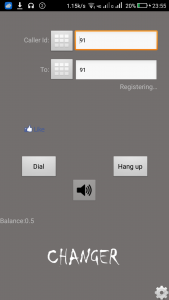
  • Download the app called ID changer from playstore without paying any cost, Because we will get it for free.

Screenshot 2017 06 21 23 55 37

  • Now just open the app by giving the specific permission for the app.

Screenshot 2017 06 21 23 53 39

  • Now see it, and you will get 91 in the fist and second columns respectively. Enter the mobile number which you want to show the caller ID and who do u want to call.

Screenshot 2017 06 21 23 55 54

  • Another person will get the call from what number we have placed before. Now they will also be thought to work like here.pavan fake call e1498071568921

Conclusion:

So, guys, it is very easy to download it and use it on your Android phone. If you have any doubts and problems regarding this post feel free to comment. Now enjoy free fake calling app on your smartphone.

Tricks5
Tricks5

I am Very Enthusiastic about Writing Tech, Smart Phones, Products Reviews, Offers, and deals. I have been writing on tricks5.com since 2015.

tricks5.com

Filed Under: Uncategorized

Wifi hotspot Make your PC to share internet

June 22, 2017 by Tricks5 Leave a Comment

Make Your Pc as Wifi hotspot

Windows can turn your laptop (or desktop) into a wifi hotspot, allowing your other devices to connect to it. With Internet Connection Sharing, it can share your Internet connection with those connected devices.

Thanks to a hidden virtual Wi-Fi adapter feature in Windows, you can even create a Wi-Fi hotspot while you’re connected to another Wi-Fi network, sharing one Wi-Fi connection over another one.

wifi hotspot

It is very possible to do this in Windows 8 and Windows 10, but the built-in method requires fiddling with the command prompt. And for some of us, walking into that black abyss is daunting.So We will First Check-out how to create wi-fi hotspot in Windows 7 and other OSes than Windows eight method will be discussed separately.

You can obviously use your PC’s internet connection on your mobile using dedicated WiFi router, hotspot software such as Connectify, Virtual Router Plus,mHotSpot and more others similar tools. Almost all of that diligent software work great.

A virtual router is a software-based system that does everything your hardware router can do (and some things it can’t). A virtual router like Connectify Hotspot can broadcast WiFi right from your PC so that any other WiFi-enabled device can get online. Connectify Hotspot is far and away the world’s most popular virtual router because it’s designed with you in mind. Using Virtual Router, users can wirelessly share any internet connection (Wifi, LAN, Cable Modem, Dial-up, Cellular, etc.) with any Wifi device (Laptop, Smart Phone, iPod Touch, iPhone, Android Phone, Zune, Netbook, wireless printer, etc.)

#Method1

Connectify:

connectify is a paid software which can be used freely with limited features it works better in free but more features available in only paid software. So Now what you expect from a virtual hotspot connectify provides many features they are

  • Files sharing over connectify peers
  • Wireless hotspot
  • Wireless repeater (Max feature)
  • Wireless router (Max feature)
  • You can use wifi network to share from your wifi network.
  • It can be started in booting process
  • You can use Custom hotspot name (Max Feature)
  • It will choose automatically which network is available to share (Max feature)
  • Auto start feature

Download Connectify

M hotspot :

  • Connect upto 10 wire less devices to the hotspot
  • Freely set your own wifi hotspot name without any restrictions
  • Share any type of Internet Connection(LAN, Ethernet,3G/4G, Wifi etc.)
  • Android phones, ipads, PDAs, tablet-pcs and other devices can access internet
  • Stream videos and shares files to clients
  • See the details of the connected device(Name, Ip Address, Mac Address)
  • See the network usage(Upload and Download Speed, Transfer Rates)
  • Secures your wireless hotspot with WPA2 PSK password security
  • Set max. number of devices that can be connected
  • Extends your Wifi range(Acts as a repeater)
  • In-app internet selection
  • Works with Windows 7,8,10
  • Also available for Android (Turns your phone into WiFi Hotspot)

Download Mhotspot

Conclusion :

Some people asks that usage of hotspots may decrese the life of laptop battries the answer is yes it is true more usage of hotspots decrease battery life prefer to use less time when you use hotspot. for more information and querys please do comments and stay tuned at tricsk5.com

Tricks5
Tricks5

I am Very Enthusiastic about Writing Tech, Smart Phones, Products Reviews, Offers, and deals. I have been writing on tricks5.com since 2015.

tricks5.com

Filed Under: Uncategorized

Increase internet speed know how

June 21, 2017 by Tricks5 Leave a Comment

Increase internet speed

It is so embarrassing when the internet connection is slow this guide helps you to increase internet speed ,increase internet speed slow wastes your patience and it’s a lot of time-consuming. Frustrating changes your mind and Interest. It’s defected your work without doing it. Many Internet providers give you affordable service, but this might be the problem with you. So, Check yourself to browse a fast internet. you can check internet speed. If you are using an android mobile and you want to earn money then Download Champcash.

Select a Best Internet Plan:

This is the important primary point that you have to choose a plan within your locality how much browsing speed will you need it. Select a plan that is suitable for your work that how much speed do you want.

  • Choose a 1MB or 2MB for solo performer with low price, if you want to go for 15MB or Higher for your Internet Uses.
  • Check whether the selected plan of speed coming from the server or not.
  • Try Different Packages for better understanding the browsing speed.
  • If you are still facing this problem, it is better to upgrade your plan.
  • Better Broadband or Better Fiber took you to better Experience of Internet Browsing world.
  • Test Your Internet Speed, see your results how to speed your internet is.

Select a Browser for Best Browsing Experience

So many people using fastest browsers like Firefox, Chrome. Internet Explorer is a Decent and Secure Browser, but It is slow while compare with Chrome and Firefox. I’m Using Chrome for better browsing there is no problem with this browser.

  • Use Google Chrome Browser for best browsing, Video loading, and access all the services from Google with secure and safe.
  • Firefox is the another browser which is used by so many are using worldwide.Use Fasterfox Lite version to speed up your browsing.
  • Clear browser cookies and caches simultaneously. Browser cookies allow you to browse fast, but it is unsafe, save when you trust that website.
  • Delete Unwanted and Unuse add-ons and Extension from browser
  • Google Chrome Extension FastestChrome add-on for better browsing experience.
  • Close Unused Tabs that will effect on consuming some data speed

You may also like :How to Speed up your WIFI Internet Connection

Reboot your router connection:

internetspeed

Sometimes router will create this problem, this is the solution for the simple problem but when you are in the big problematic situation this will won’t work. Rebooting Router means the starting fresh with the easy format so, that will cause some changes in default mode. It with router problem may set by rebooting your router. One more thing is to perform is that “RePosition” your router from any signal distraction, set into a free place to emit signals in the whole house or office.

Check here : Internet History, How Internet Came In to Our Daily Life

Check Your Computer Settings

  • Clean your system from the distraction of third party viruses and harmful trojans.
  • It is better to use Antivirus for your system.
  • Clean Unwanted and Unused apps in your system that will consume very high data running background.
  • Keep Free Space on your computer. With high full of data will slow down your Computer and Connection to the Internet.
  • Always use the upgraded system for better results.
  • Always update your apps and browsers

Check whether Someone using your Intenet connection

  • Change your password frequently to avoid from stealing your passwords
  • Install a scanning software to scan which is using your computer as a host.
  • Check Frequently Internet speeding and for their solutions.

Use UC browser

use UC browser to avoid ads on pages which will consume a lot of time and it has many shortcuts which will help you browse very faster.

Change your DNS servers to Google servers so that it will increase speed of internet

Google DNs servers are :

  1. Primary DNS 8.8.8.8
  2. Secondary DNS servers are 4.4.4.4

Conclusion:

It makes us feel good when you browse speed and it also saves your time and gives results fast make use of these tricks of you find any better we will update post to increase internet speed, Dont hesitate to comment we will come up with best tricks staty tuned.

Tricks5
Tricks5

I am Very Enthusiastic about Writing Tech, Smart Phones, Products Reviews, Offers, and deals. I have been writing on tricks5.com since 2015.

tricks5.com

Filed Under: Uncategorized

Airtel balance transfer to another airtel ??

June 20, 2017 by Tricks5 Leave a Comment

airtel balance transfer

Hello, guys In this guide is about airtel balance transfer, youWe will tell you How to transfer a balance from Airtel to Airtel. Recently we come up with a trick which gives free airtel 3g and 4g You have an Airtel; you want to transfer amount to other airtel no then just follow my Guide. We will explain you by step by step so that you can find requirements before you transfer to other Airtel. If you want to earn money without investment download camp cash.

This is a simple Airtel Balance transfer code  *141#

Airtel balance transfer requirements

  • Airtel Sim with Minimum of 3 months old to use airtel balance transfer option
  • At least 17rs main balance to move minimum of 5 rs
  • Used code is Given below also check screen shots

Note: It is working in All India With Same procedure so no need to worry and it is verified can check screenshots for proof

How to transfer Balance from One Airtel Mobile to another number:

    • Dial This USSD code to get a menu to as first stepairtel balance transfer
  • Now you will find a return Menu which will show options to transfer balance from airtel to airtel
  • You will find options like share talk time, adv talk time, giftpack, call me back SMS.
  • Choose share talk time option and  press Send
  • then it will ask how much money you want to send to other airtel no airtel balance transfer
  • Enter amount for example if you send 40rs then it will deduct 45 rs(including service charges for transfer)airtel balance transfer
  • Then confirm & Enter mobile number money will be transferred successfully
  • Both of you receive a message which shows successful transfer of balance

Additional Notes:

  • *141#  and choose ADV to talk time to get a loan from Airtel will be added instantly and later we need to pay back extra Rs as service charge
  • select to call me back SMS and enter number of a person who should call you it will only work when your balance is below 1 rupee

If you transferred balance with the same step by step, then money will be credited instantly to other person check another mobile you find balance added to both of you.

Also, How to get free airtel 3g & 4G from hammer VPN and droid VPN

Conclusion:

Thank you  guys this is the best way to airtel balance transfer you can also transfer airtel to airtel from airtel app and Airtel website ,want to browse for free , you also check Droid VPN trick to get free data when you can use data back app and get refunded original data balance for free, it is very useful when you have less balance use call me back when your balance is below 1 rupee.

Tricks5
Tricks5

I am Very Enthusiastic about Writing Tech, Smart Phones, Products Reviews, Offers, and deals. I have been writing on tricks5.com since 2015.

tricks5.com

Filed Under: Uncategorized

How to Avoid and Beware of Technology Addiction

June 20, 2017 by Tricks5 Leave a Comment

We are on 21th Century, In our daily we use most of the gadgets and we can’t live without them. Everybody should aware and use these technology devices in our limits. If, not they so, will in trouble to face disorders. Have you ever thought of technology addiction i do some people stick into Facebook for hours together, they may not know that they are addicted, but we can get what’s wrong with him.

What could you only addict too?Technology Addiction

She is sharing her story when she has locked the mobile phone in the car. In observations, She had addicted to mobile phone and social media sites. We chat and speak more than human beings on mobile only. We are addicted to our man made gadgets How to overcome them all from.

Playing Video Games

Everyone like to play video games, but this is very dangerous and harmful our healthy life. When you addicted with this nobody can stop you. You have to understand yourselves. First, this is the dangerous situation. If you starting now just stop it and go for outdoor games to play.

According to the researchers, our brain changes while playing video games. Our brain couldn’t work properly if you most addicted while reading, writing and playing outdoor games. It effects our neurotransmitters like dopamine; they couldn’t work after for recognising things and in concentration.

Liking and Sharing

If anybody Didn’t like your Profile Picture or Sharing content, you would get angry. If you Surf The Internet daily, In a system and mobile phone. This is the time to change your mind from unwanted things to the right things, Stop browsing and tapping social media buttons.

What would happen if you couldn’t change, How could I change?

Addiction is that type of diseases it can’t control you. You may saw some people took drugs for the just purpose, but they even control themselves. This is the Dangerous situation some people fall into this trap. You may lose your memory, concentration, skills, developing reading and mapping things.

See the Situation of this person:

He Played Games for 22days and after he died. His name was Rustam, 17 years old boy. He spent more than 2,000 hours playing video games; only he stops to sleep and eat. The unbelievable death happened in the town of uchay in the southern Russia’s Republic of Bashkortostan.

Doctors Said that He could have died from the second class syndrome, thrombosis from not moving around, as on a cramped long-haul flight. They were rushed to the hospital for treatment, but doctors declared he was dead on arrival this is peak stage of Technology Addiction.

What could you to Change to avoid Technology Addiction?

This is the time to change yourself. You need to setup your clear boundaries and Don’t waste your time while surfing internet and Playing games. Delete the- thought of playing games in your mind, and participate in natural games.

Daily Exercise and Yoga

This is the great medicine for you, morning exercise and yoga will change your life brighter and glowing. Yoga is the Best medicine to control our mind; this is the ancient exercise. At least wakeup morning and do Meditation.

Go for a casual walk

The simple walk may change your mind, walk in streets and chit chat with some one friendly. Help them to get their work done if you fell comfortable.

Holiday Trip

Make Holiday trips and picnics. This is one of thing to change our mind; green surroundings will affect on changing good mind. If you do not make any holiday trip at least go in the gardens, and parks.

Do Some Physical Works When you bore

Do some work to divert your mind from your gadget, go for small gardening works, Creating compound, and planting trees, etc…,

Conclusion:

Many of us undergone on addiction but very few realise and learns to avoid addiction it leads to dangerous problems even death so be aware of technology Addiction, please support us by following on facebook, Google plus andtwitter to get updates & For any questions or advice comment below i will try to help out thanks for visiting and stay tuned here at tricks5.com for more tricks,offers& more like this.

Tricks5
Tricks5

I am Very Enthusiastic about Writing Tech, Smart Phones, Products Reviews, Offers, and deals. I have been writing on tricks5.com since 2015.

tricks5.com

Filed Under: Uncategorized

  • « Previous Page
  • 1
  • …
  • 75
  • 76
  • 77
  • 78
  • 79
  • …
  • 81
  • Next Page »

Also Check

Free Calling Websites

Unlist Number from truecaller

Whatsapp group names

Oyo Referral code

Recent Posts

  • OYO Room Referral Code (GADDJV48M) Free 1000rs 2026
  • Linode Referral code (Free 100$ Credit) free 2 months 2026
  • 25+Best Free Calling Sites without Registration 2026
  • (200+) Whatsapp group names for friends,More 2026
  • How To Unlist Phone number from Truecaller 2026

  • OYO Room Referral Code (GADDJV48M) Free 1000rs 2026
  • Linode Referral code (Free 100$ Credit) free 2 months 2026
  • 25+Best Free Calling Sites without Registration 2026
  • (200+) Whatsapp group names for friends,More 2026
  • How To Unlist Phone number from Truecaller 2026
  • About
  • Contact Us
  • Privacy policy
  • Terms and Conditions

Copyright © 2026 · Designed By Tricks5.com

  • Contact Us
  • Terms and Conditions
  • Privacy policy