Tricks5

  • Home
  • Referral Code
  • Technology
You are here: Home / Archives for Uncategorized

Whatsapp PC -How to install Whatsapp on PC (Guide)

June 18, 2017 by Tricks5 Leave a Comment

hello, friends, Some or other time you may have a thought of installing Whatsapp on PC or WhatsApp PC, Here are Someways by which you can use WhatsApp on PC, It can be possible with Bluestacks and other Virtual wares.

Whatsapp On Pc With Whatsapp web:whatsapp pc

1.Just visit Whatsapp web portal

Whatsapp Web

2. Scan QR code with Mobile

3. Once It was done messages Synchronize between both Mobile and Pc

4. Mobile Needs always to connect to the internet to sync In real time.

WhatsApp PC Official Whatsapp:

In below image, we are used Windows 64bit windows 10 installed Os. As WhatsApp Detects your device, it recommends, or you can manually find and download

whatsapp pc

Download Whatsapp for windows

Steps to Setup whatsapp on Pc:

  1. Download whatsapp or Gb whatsapp on Android
  2.  In your Whatsapp app on right top click on three dots.
  3. Choose whatsapp Web
  4.  Then open Downloaded App in Desktop >> Install App >> You find QR Code(You must be connected to the Internet)
  5. Then scan that QR code with mobile. It would sync data from your mobile.
  6. Enjoy Whatsapp on PC.

Read: Run dual whatsapp account on Android Device Rooted & non-rooted.

Make your PC compatible with Apk(android) files once you install bluestacks then you can install all remaining apps from play store, but I recommend not to install more apps. As it may use more system resources and decrease system performance. For better experience always use the latest version.

Related : 

  • What is the IMEI Number What is it used for?
  • Root Android and un root – With or Without PC
  • IMO PC-How to Install IMO on PC without Bluestacks
  • Bypass SMS verification on App or Website (Verified Now)
  • Make Free Conference call Try now (Latest 2017)

Whatsapp On PC With Bluestacks:

Download Latest version of bluestacks To check Step by step procedure Check how to install bluestacks on PC. 

Once you install bluestacks go to play store in bluestacks, Download it and just like regular WhatsApp and but need to enter OTP manually, and you are Done. If you have any Problems in installing bluestacks, then check  How to uninstall bluestacks completely.

Note: Don’t download apps that say that it works with the desktop because may contain the virus.

Final Words:

If works fine for me if it is helpful for you to like our page if you any problems do comment we try to help out. Keep visiting tricks5 for more updates and tricks like this.

Tricks5
Tricks5

I am Very Enthusiastic about Writing Tech, Smart Phones, Products Reviews, Offers, and deals. I have been writing on tricks5.com since 2015.

tricks5.com

Filed Under: Uncategorized

Block ads : know how to block ads on youtube

June 18, 2017 by Tricks5 Leave a Comment

Block ads on youtube :

When you browse the video on Youtube every video will show you interrupted ads this is the drive you crazy and so much disturbance for your serious work.block ads on youtube, how can you stop these advertisements?

There is one solution for your ad interruption for your Youtube Videos.

Adblock Plusblock ads

It is also a great tool that you can surf the web without annoying ads. Adblock is an open source project using more than 300 million users. Adblock can block tracking, malware domains, banners, pop-ups and video ads including in Facebook and YouTube also.

By Using Adblock tool, you can benefit Several Services by

Blocking and Acceptable Ads

The choice is your for ads if you want to see ads on the website you can Enable this feature and if you want to disable as your choice. This is possible to block like flashy banners, pop-ups and much more.

Disable Social Media Buttons

Disable sharing buttons which do you didn’t want like facebook, twitter, google and other websites. You can disable all websites features of sharing of social media buttons.

Disable Tracking

In today’s online world no. of firms tracking your online activity and browsing history. with this feature of ad-block plus, you can easily disable tracking.

Disable Malware Domains

Your computer is slow when you opening and your browser is riddled with more pop ups it may be infected with malware and harmful viruses. You need to install Adblock plus because Adblock is protected your computer against viruses, trojan horses, worms, adware, and spyware.

And You can use Typo Protection (Adblock Plus feature for Firefox and typo protection was removed in Adblock Plus version 2.3. If you miss this feature, you can get it back by installing our URL Fixer extension.)

Get Fantastic Feature for your Chrome Browser  Extension

Try Their Adblock Browser

Make your smartphone super fast by using Adblock browser.You can use their tool on your smartphone. Download their Browser and Browse fast, safe and free of without ads with Adblock Browser.

  • Remove Duplicate Emails in Outlook using Cleanup Utility
  • GB WhatsApp latest version
  • Free Airtel Internet latest (2 Tricks) (working)Conclusion:

You can block ads on browser that you uses blocking ads will make your page to load faster and helps to use fewer data in this post you can block ads on youtube also check trick for free airtel 3g,please support us by following on Facebook, Google plus and twitter to get updates & For any questions or advice comment below I will try to help out thanks for visiting and stay tuned here at tricks5.com for more tricks, offers& more like this.

Tricks5
Tricks5

I am Very Enthusiastic about Writing Tech, Smart Phones, Products Reviews, Offers, and deals. I have been writing on tricks5.com since 2015.

tricks5.com

Filed Under: Uncategorized

Recover deleted files from a drive

June 17, 2017 by Tricks5 Leave a Comment

How to recover deleted files:

Hello guys, you can recover permanently deleted files from a drive that too with east method , spend 5 mints time you will get how to recover deleted files recently we came with how to recover deleted photos lets go..

Whether recovering photos is easy, difficult, or impossible depends on a number of factors. One important factor is where the photos are stored. If they’re on a removable card, such as an SD card, you’re in luck. If they’re in your phone’s internal storage, you’ve got a far more serious problem but from external storage we can recover deleted files very easily .

recover deleted filesEither way, the more you write to that storage, the less likely that you’ll ever see those pictures again. So if they are on a removable card, remove the card now. If they’re in your phone’s internal memory, use the phone as little as possible—just calls and texts. Keep it that way until you either successfully restore your images or give up.

If the photos are on a removable card Download and install Piriform’s Recuva onto your Windows PC. The free version should

You probably already have a way to connect your card to your PC. If not, you can buy an SD card adapter, or a MicroSD adapter, for less than 5$.

With the card connected to your PC, load Recuva and scan the card (which appears as a portable drive). Recuva will almost certainly find most of your photos, and on your command, copy them to your PC’s internal drive.

Download Recuva

Superior file recovery

Recuva can recover pictures, music, documents, videos, emails or any other file type you’ve lost. And it can recover from any rewriteable media you have: memory cards, external hard drives, USB sticks and more!

Also check out : Get free Grammarly premium

Recover deleted files from damaged disks

Unlike most file recovery tools, Recuva can recover files from damaged or newly formatted drives. Greater flexibility means greater chance of recovery.

Deep scan for buried files

For those hard to find files, Recuva has an advanced deep scan mode that scours your drives to find any traces of files you have deleted

Securely delete files

Sometimes you want a file gone for good. Recuva’s secure overwrite feature uses industry- and military-standard deletion techniques to make sure your files stay erased.

If the photos are in your phone’s internal storage If your phone is running an outdated version of Android, you can connect your phone to your PC via a MicroUSB cable, and select the USB Mass Storage option on your phone (pull down the notification bar at the top of the screen and tap the USB icon). That effectively turns your phone into an external drive, and you can use Recuva (see above) to restore it.

Unfortunately, Android disabled USB Mass storage with version 4.4.2. There are tools that can scan your phone from your Windows PC and recover files, but they’re not as quick and easy (or as free) as Recuva. Your best bet is probably EASEus’ MobiSaver for Android. Install this program in Windows, connect your phone, and follow the directions. But it will probably require you to root your phone.

Avoiding this disaster in the future

Take these steps to avoid such disasters in the future:

Get a Dropbox account, and install the app on your phone (Android or iOS).

Turn on the Camera Upload feature (you’ll find it in Dropbox’ Settings).

Your photos will automatically upload to your Dropbox whenever the phone has a Wi-Fi connection.

Get in the habit of copying photos to your PC or another storage device as often as possible—even when you’re on vacation.

If you’re using an Android phone, tell it to save photos to the SD card. Exactly how you do that depends on your phone and version of Android, but it will probably be in your camera app’s settings menu.

  • Earn unlimited with Champcash & Get used internet data back to your account

Incoming search terms : recover deleted data,recover deleted files ,data recovery,file recovery,restore deleted files,deleted file recovery , recovering deleted files , retrieve deleted files , recover lost files , file recovery tool  , recover data from hard drive , recover deleted files free , how to restore deleted files.

Conclusion:

Recuva is best software torecover deleted files any type of files and it is free it has deep scan feature which helps ato scan every block of a drive it is useful,please support us by following on facebook, Google plus and twitter to get updates & For any questions or advice comment below i will try to help out thanks for visiting and stay tuned here at tricks5.com for more tricks,offers& more like this.

Tricks5
Tricks5

I am Very Enthusiastic about Writing Tech, Smart Phones, Products Reviews, Offers, and deals. I have been writing on tricks5.com since 2015.

tricks5.com

Filed Under: Uncategorized

Digitalworks done online Fiverr more securely

June 11, 2017 by Tricks5 Leave a Comment

Get digitalworks done online, Hello friends, Many of us wants to do some our digitalworks done by some one but where to find them if what is the security they will do best here is the best solutions to do your digital works online,we may don’t have much time or we are new to this here comes a online solution Fiver.com you can find best services at just 5$.

digitalworks

Join Fiverr Now

Find out What digitalworks you can get from fiver :

  1. Digital Marketing

    • Web Analytics
    • Domain Research
    • SEO
    • Social Media Marketing
    • Web Traffic
    • Video Advertising
    • Content Marketing
    • Email Marketing


    • SEM
    • Local Listings
    • Influencer Marketing
    • Marketing Strategy
    • Mobile Advertisingfivertricks5
  2. Writing and translation

    • Business Copywriting
    • Creative Writing
    • Translation
    • Transcription
    • Resumes & Cover Letters
    • Proofreading & Editing
    • Press Releases
    • Articles & Blog Posts
    • Research & Summaries
    • Legal Writing
  3. Video &  Animation

    • Whiteboard & Explainer Videos
    • Spokespersons & Testimonials
    • Intros & Animated Logos
    • Promotional & Brand Videos
    • Lyric & Music Videos
    • Editing & Post Production
    • Video Greetings
    • Animated Characters & Modeling
  4. Music & Audio 

    • Mixing & Mastering
    • Jingles & Drops
    • Voice-Overs
    • Sound Effects
    • Session Musicians
    • Producers & Composers
    • Singers & Songwriters
  5. Programing & Tech

    • WordPress
    • Web Programming
    • Mobile Apps & Web
    • Website Builders & CMS
    • Convert Files
    • Ecommerce
    • User Testing
    • QA
    • Databases
    • Desktop Applications
    • Data Analysis & Reports
    • Support & IT
  6. Advertising 

    • Hold Your Sign
    • Flyers & Handouts
    • Human Billboards
    • Pet Models
    • Outdoor Advertising
    • Radio
    • Music Promotion
    • Banner Advertising
  7. Business

    • Business Plans
    • Career Advice
    • Market Research
    • Presentations
    • Virtual Assistant
    • Business Tips


    • Branding Services
    • Financial Consulting
    • Legal Consulting
  8. Life Style

    • Animal Care & Pets
    • Relationship Advice
    • Diet & Weight Loss
    • Health & Fitness
    • Makeup, Styling & Beauty
    • Online Private Lessons
    • Astrology & Fortune Telling
    • Spiritual & Healing
    • Cooking Recipes
    • Parenting Tips
    • Travel
  9. GIfts

    • Greeting Cards
    • Unusual Gifts
    • Arts & Crafts
    • Handmade Jewellery
    • Gifts For Geeks
    • Postcards From…
    • Recycled Crafts
  10. Fun & bizarre

    • Your Message On…
    • Extremely Bizarre
    • Celebrity Impersonators
    • Daredevils & Stunts
    • Pranks
    • Dancers
    • Just For Fun
  11. Graphics And Designing

    • Cartoons & Caricatures
    • Logo Design
    • Illustration
    • Book Covers & Packaging
    • Photoshop Editing
    • Flyers & Posters
    • Business Cards & Stationery
    • Banner Ads
    • Social Media Design
    • 3D & 2D Models
    • Web & Mobile Design
    • Presentations & Infographics
    • Invitations
    • T-Shirts
    • Vector Tracing

Conclusion:

fiver is the best place to order digital works online i personally my digital works done on fiver it very easy and can belive  in what we do,please support us by following onfacebook,Google plus and twitter to get updates & For any questions or advice comment below i will try to help out thanks for visiting and stay tuned here attricks5.com for more tricks,offers& more like this


Tricks5
Tricks5

I am Very Enthusiastic about Writing Tech, Smart Phones, Products Reviews, Offers, and deals. I have been writing on tricks5.com since 2015.

tricks5.com

Filed Under: Uncategorized

Amazon referral Earn 200₹ per you & get 100₹ who joins

June 11, 2017 by Tricks5 3 Comments

Amazon referral Program

Amazon India has organized an amazing amazon referral offer (amazon referral  program)Just refer your friends to shop via amazon and earn 200 Rs every time they shop, your friend also gets a 100 Rs reward, The rewards will be given as a gift card from amazon ,check snap deal refer,true balance refer you can refer in 3 ways either share your referral link on your website, email, share on facebook or invite your friends directly by sending emails, You can send email to 5 members at a time, Amazon is leading E-commerce in India has huge payment gateways, cash on delivery, variety of items and many other best options and daily deals with amazing discount

amazon referralyou can find full instructions and terms and conditions

Follow the steps to avail amazon referral program offer:-

  1. Visit Amazon And login into your account visit Refer and earn page here 
  2. Refer your friends with facebook, email, Sharing in your website
  3. Check Gift card Balance

amazon referral

Make sure that you are inviting your friends only because inviting unknown people will lead to spamming and cancelation of your gift cards.

Amazon referral Notes:-

  • The gift card will remain valid for one year,
  • The gift card will get credited to your amazon account within 4 days,
  • The gift cards cannot be used to buy other gift cards or pay shipping charges,
  • The gift card’s balance can be checked with “Manage your gift cards page”,
  • The referral link can be emailed to 5 users at once.

Download Amazon App :

amazon referral

Amazon Gift card proof:


Amazon Referral program now :
amazon referral
  • Proof Added-Use Databack to get free data

  • Get Grammarly premium free

  • CHAMPCASH EARN UNLIMITED DIRECT TO BANK & 1$(RS.68) JOINING BONUS FREE

Previously Amazon Referal Porgram :

amazon referral
Proof

Terms and Conditions for amazon referral (updated on February 22, 2016):

These Amazon.in Refer and Earn Program Terms and Conditions are in addition to the Amazon.inConditions of Use to which you also agree by using the Amazon.in website and the Terms and Conditions for the Amazon.in Gift Card (” Gift Card Terms “) issued by Qwikcilver Solutions Private Limited (“Qwikcilver“). To the extent the Amazon Conditions of Use are inconsistent with these terms, these terms will control with respect to the Amazon.in Refer and Earn Program only. To the extent the Gift Card Terms are inconsistent with these terms, these terms will control with respect to the Amazon.in Refer and Earn Program only.

For you to receive a referral bonus for inviting a new Amazon.in member,

  1. You must have a valid customer account on Amazon.in website
  2. The customer you refer must click on your link and successfully complete the Amazon.in signup process on the same calendar day
  3. The referred customer who registered the new account must be new (and not a returning or existing) Amazon.in customer. We will determine in our sole discretion whether the customer is new to Amazon.in
  4. The referred customer must place an order worth Rs. 200 (excluding shipping, handling and gift-wrapping fees) or more on the Amazon.in website. Purchases of Kindle ebooks and Amazon.in Gift Cards are not eligible; and
  5. The referred customer must not cancel the order prior to shipment and the order must not be returned or refunded.

You will receive your referral credit as an Amazon.in Gift Card issued by Qwikcilver (“Gift Card”) via email within 30 days after the new Amazon.in customer’s order has shipped.

Notwithstanding anything contained in these terms, these terms shall be in addition to and not in derogation to any other terms as stipulated by Qwikcilver for pre-paid cards from time to time. The Gift Card will be valid for one year from the date it is sent to your email address (which is registered at Amazon.in) i.e. the date of issuance of such Gift Card. Your Gift Card balance will be automatically applied to your purchases on Amazon.in at checkout in the order in which they expire (i.e., first to expire will be applied first). See the Gift Card Terms for additional details.

You cannot use Gift Cards to buy additional gift cards or to pay shipping, handling, taxes, or any other applicable transaction costs. We may also specify certain products that are ineligible for payment using Gift cards earned under these terms from time to time.

Gift Cards are issued to a single Amazon account at our sole discretion and cannot be reloaded, resold, transferred for value, or redeemed for cash, except to the extent required by law.

Participation in the Amazon.in Refer and Earn Program may require you to submit personal information about you and the customers you refer, such as name and email address. You agree to receive communications from us with regard to your participation in the Amazon.in Refer and Earn Program, and to allow us to communicate with your friends about your participation (for example, by disclosing to your friends that an invitation was sent by you). Any information collected from you or your referred customers as part of the Amazon.in Refer and Earn Program will be subject to Amazon’s Privacy’s Notice.

If you participate in an Amazon affiliate marketing program, such as Amazon.in Associates, you will not receive Gift cards for any transaction for which you receive affiliate advertising fees.

We may terminate your eligibility to earn Gift Cards or terminate your account, or the accounts of Amazon.in members you refer, if you or they take any of the following actions:

  1. Open multiple accounts, including with different e-mail addresses, for the same person in order to generate additional referral credits;
  2. Refer customers using spam, display advertising, sponsored links, unsolicited e-mails, or links on message boards or forums.
  3. Distribute your personal invite link via IM clients, text messages or in any other offline method (e.g in any printed material, mail or other document, or any oral solicitation);
  4. Use false names, impersonate other people, or otherwise provide false or misleading information to us;
  5. Offer incentives to others who register new accounts;
  6. Violate these terms or any other terms and conditions on Amazon.in, including but not limited to the Gift Card Terms in any way; or
  7. Participate in the Amazon.in Refer and Earn Program where doing so would be prohibited by any applicable law or regulations.

Conclusion:

It is a fully verified offer fromAmazon and fluctuating between 150 to 200 rs per refferal you can check snapdeal refer,freecharge,champcash,truebalance these are the most viewed refer and earn offers on my site,please support us by following onfacebook,Google plus and twitter to get updates & For any questions or advice comment below i will try to help out thanks for visiting and stay tuned here attricks5.com for more tricks,offers& more like this.

Tricks5
Tricks5

I am Very Enthusiastic about Writing Tech, Smart Phones, Products Reviews, Offers, and deals. I have been writing on tricks5.com since 2015.

tricks5.com

Filed Under: Uncategorized

Remove Duplicate Emails in Outlook using Cleanup Utility

June 7, 2017 by Tricks5 Leave a Comment

Know Remove Duplicate Emails in Outlook 

Secure way to Remove Duplicate Emails In Outlook 2016. Fix Error of Email Duplications in Outlook 2016 & delete duplicate PST using Clean Up inbuilt utility.

Glossary:

In this blog, we discussed how we can Remove Duplicate Emails in Outlook 2016 and the reasons behind the replication of the messages present in Outlook versions and narrates the best possible way to resolve the issue of email duplication in Outlook without harming the functionality of Mailboxes.

Email duplication in Outlook 2016 mailbox- A major concern

This error occurs when there is more than one replica of mailbox data. It means that emails messages get assembled together in the mailbox and damages the output and performance of the product. If this ever happened to you, then you must be looking for a solution which not only solves your problem but is reliable too. A User can go for different ways to remove duplicate emails in Outlook 2016 from PST files of Outlook so that user can store data in an assembled way.

The data which is replicated will not only devour space, but makes your email application of large size. Whenever the PST size of a file is oversized, and most of the times it leads to corruption of file.

Issue Due To Email Duplication in Outlook

Replica of items in a Mailboxes can cause various problems in a configured account. The issues can jot down and slow the performance of Outlook file or Application, corruption in PST files and many more errors may occur. Thus it becomes the primary concern to remove duplicate emails in Outlook PST file. Let’s know some possible outcomes of Email Duplication in Outlook items in details.

  • The productivity of mailboxes can be affected by duplication issue and may lead to error.
  • Every time whenever a user starts an application, all the messages that are stored on the server are reloaded and it affects working of a system.
  • Corruption lead by the creation of more than one copy of an email message or other mailbox item makes the PST oversized.
  • Considering business users also as they have to deal with many email messages and have to reply to each and every message, replication may be a major issue.

    Reasons Behind Email Duplication In Outlook 2016

  • Incorrect Organization Rules: During configuration of Outlook account one toggles around the rules. In the case, the rules might be configured incorrectly. It gives a sign of procrastination while one receives any email message as it piles up the data replication in the Outlook Mailbox.
  • Short intervals in Sending/Receiving messages: Brief frequency of updates in Inbox leads to synchronization problems in the Mailbox. The problem gives the result as replication of data and not every component of the mailbox which may include email messages in Outlook as they do not get synchronized.
  • Incorrect Account Setup: Creating multiple accounts of the same email can create a main issue related to the synchronization problem. It may cause incoming data show repeatedly and then it will create a big problem for the user. This might be the reason why the user encounters replication of emails in Outlook.
  • An inaccurate setting of the mailboxes: Sometimes incorrect setting in the Mailbox when a user configures the account. While configuring an account a user must be clear with all the credentials provided that includes receiving the same Email messages, entries in Calendar and saving contact multiple times. To remove duplicate Outlook contacts user can go for manual steps.
  • Using an Anti-virus Software: While installing an anti-virus software in your machine that keeps a check on the functionality of Outlook, there might occur a possibility when the Anti-virus scanner may intercept sending and receiving messages lead to email duplication in Outlook.

    Above mentioned reason can be lead to email duplication in Outlook. To avoid the issue and remove duplicate emails in Outlook PST File, first user has to understand the reason of creation of these duplicates files.

    Method to Delete Duplicate Messages in Outlook 2016

    When we try to fix the error of Email duplication in Outlook, first you have to understand the actual reason of the problem. After detected the case why it happens, then users need to apply the proper solution. Few tips are mentioned below that we can use to remove duplicate emails in Outlook:

  • Configuration of rules properly

    Keep a note on Outlook rules to make sure that whether they are properly configured or not as it creates a problem among various folders present in emails.

  • Set update frequency in Inbox
    • Users can increase the update frequency of Inbox by the following methods:
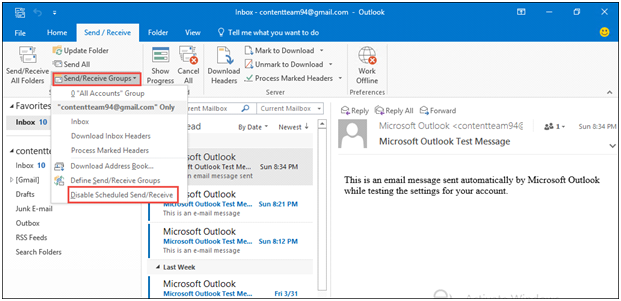
    • Open Outlook and then hit on Send/Receive button

      Remove Duplicate Emails

  • Next, Select→ define send/receive group
  • Click Schedule an automatic Send/Receive value to anything between any time.

    060717 1252 RemoveDupli2

  • Run cleaning up option for Inbox

    MS Outlook comes with an astonishing feature that removes duplicate emails in Outlook PST File. One such inbuilt utility is clean-up that can be executed manually in the application. To perform the process, we need to run a cleanup for removing replicated emails. The steps are mentioned below:

  • Open MS Outlook 2016
  • Select Inbox and find out duplicated emails.
  • Click Home menu and hit on cleanup option.

    060717 1252 RemoveDupli3

    • Select clean Up Conversation from the option of drop down to remove duplicate in PST File. This will delete and move duplicate email message present in the conversation to delete items. If you want to delete the messages permanently then right click on the deleted items folder and delete the duplicated emails.

      Above method can help user to delete duplicate messages in Outlook 2016, but user can try Outlook duplicates remover tools to
      remove duplicate emails in Outlook data file
      and other replicated contacts, calendar files in Outlook

      Check Tool Now: 

    Observation

    After observing error of Email duplication in Outlook become the general issues sometimes. Without any doubt, it affects the functionality, performance as well as productivity of the mailbox. The user can apply manual methods to remove duplicate emails in Outlook PST File, but manual methods have some limitations. a third party tool can be a good solution to delete duplicate messages in Outlook.

Tricks5
Tricks5

I am Very Enthusiastic about Writing Tech, Smart Phones, Products Reviews, Offers, and deals. I have been writing on tricks5.com since 2015.

tricks5.com

Filed Under: Uncategorized

QR Code, Generate your own qr now (Learn Now)

June 6, 2017 by Tricks5 Leave a Comment

 Qr code:

qr code

This QR code is for tricks5.com

Usually, we find QR code on many products, and in many papers, these QR codes can be Quick response codes nowadays these Codes are very Popular in the market. Those graphic codes will help to store valuable information. Some Businesses made a relation information to a customer with the help of QR Codes. It is a machine readable code it contains black and white squares; it will open automatically when you scan with a smartphone or any readable hypertext it stores image based hyper text link and learn to Find unknown numbers true caller.

What is the Use of QR:

Qr code is like a bar code that has become so ubiquitous in the retail world. QR Code uses for opening a web page, sending a message and downloading images. It .. Customers will know the products details and descriptions.The code is used for Business Purposes to offer something unique products.

  • Crown it Refer Code Prash6606 Get cashback.

How Can you make QR Codes?:

It is a simple to generate QR Code as your own . You can make QR Codes by using designated 2D barcode generators. Some websites are offering to make QR codes listed below see and enjoy creating barcodes.

Generate Now

Alternatives :

  • www.goqr.me
  • www.qr-code-generator.com
  • www.qrstuff.com

How many types of QR codes you can make:

you can make QR codes of many types they are a mobile phone, QR codes with logo, QR codes with URLs, pdf files, t-shirts,v cards, more.

  • Find unknown numbers, true caller
  • Whatsapp PC -How to install Whatsapp on PC (Guide)

Conclusion:

you can create your own qr codes from above websites, it is very easy to free and very fast know how to use QR codes you can create qr codes for images,URLs, pdf files and more, please support us by following on facebook, Google plus and twitter to get updates & For any questions or advice comment below i will try to help out thanks for visiting and stay tuned here at tricks5.com for more tricks, offers& more like this.

Tricks5
Tricks5

I am Very Enthusiastic about Writing Tech, Smart Phones, Products Reviews, Offers, and deals. I have been writing on tricks5.com since 2015.

tricks5.com

Filed Under: Uncategorized

How To install bluestacks Android on PC (Windows )

May 26, 2017 by Tricks5 Leave a Comment

Install Bluestacks on Windows Operating system

Install Bluestacks on Windows, There are many other various posts on many blogs. It is step by step procedure to install BlueStacks with screenshots. These screenshots were taken on Windows 8.1 these are same steps that can work on any version of windows. If you are using Bluestacks for using IMO on the desktop here is a guide how to install IMO without BlueStacks.

Note: Installing Bluestacks leads may slow down your computer.


#Procedure

Step by step procedure to Install BlueStacks:

  1. Download Latest version of BueStacks from here
  2. It is a bit large file around it takes some time nd click on downloaded file to run the application.
  3. Give administration access to install App
  4. It Is extracting wait until it completes 100%bluestacks (6)
  5. Then click on Installbluestacks (9)bluestacks (7)
  6. Choose the location where you want to install BlueStacks if you don’t want to change leave just like that.bluestacks (8)
  7. Click on Next and BlueStuacks starts installingbluestacks (11)
  8. Once Installation completes asking to start bluestacksinstall bluestacks
  9. Bluestacks ask to wait till it completes some installation process & Starting configuration.install bluestacks
  10. It may take some time depending on your internet connection, please wait.install bluestacks
  11. Login with Google and give location access(If you want to share)install bluestacks
  12. install bluestacks
  13. Click on later to add a debit card or credit card if you have not added before.
  14. install bluestacks
  15. Now installation is completed.
  16. Give a name to your tablet and Do whatever you want.
  17. You can access play store directly from blue stacks.

use Lucky Patcher with the bluestacks


Conclusion :

You can run many apps in BlueStacks, generally if is very good to use same as an android device.check how your If you have any problems in installing BlueStcks, please contact blue stacks support for more tricks Stay updated at tricks5.com

Tricks5
Tricks5

I am Very Enthusiastic about Writing Tech, Smart Phones, Products Reviews, Offers, and deals. I have been writing on tricks5.com since 2015.

tricks5.com

Filed Under: Uncategorized

Windows 8 launcher for Android Get experience of using Windows

May 24, 2017 by Tricks5 Leave a Comment

Hello all, Windows 8 launcher provides great UI which looks same as windows 8 in android mobiles. You can also use windows 8 launcher to look same as Windows Mobile?

Want to be your UI like  Windows Phone?

Windows Launcher 8, is an excellent app for you to experience the Windows Phone user interface style on your 4.0 above  Android devices. It will make your 4.0 and above Android phone’s home screen looks like a Windows Phone.windows 8 launcher
With this fast, clean launcher, you can customise personalised Windows phone layout for your Android 4.0 above phone. It has simple options you learn how to use Windows 8 Launcher, It is a good theme will be loved by everyone.

You can contact theme developer for any changes and support fb.com/launcher8

Features:

–Choose different sizes of tiles, modify colours and icons of the tiles;
—-You can add special features tiles, like time, LED light, Live Gallery and Live contact.
—Add you’re necessary thoughts to manage the LockScreen with style and password in settings;
—Control your StatusBar with style, time display, and colour settings;
– DIY folder: Create new tabs for the folder. Hide & lock folders with password;
—Backup and restore theme. Themes can be uploaded and downloaded online;
–you can use Rich wallpaper resources for background, lock screen available online, also support dynamic wallpaper;
—- App notifications: DIY the display mode for your application’s message notifications alerts.
Bigger and quicker search ability for the web and local information.

  • Get free mobile data on airtel
  • Earn from Champcash

Reminder :

To use some apps directly, this Needs extra permissions


Note: notification feature requires manual activation. 

How to activate: 

 Settings ->>then goto >>General ->>>then goto >> Notification settings ->>then goto >>> On (under Push).

Download Windows 8 Launcher:

Download launcher Now

 Conclusion :

This is the best option to enjoy windows8 UI experience in Android mobile.Stay tuned for more tricks and tips.if you find any difficulties in installing please do comment if you want to always online on Whatsapp always online.

Tricks5
Tricks5

I am Very Enthusiastic about Writing Tech, Smart Phones, Products Reviews, Offers, and deals. I have been writing on tricks5.com since 2015.

tricks5.com

Filed Under: Uncategorized

Bypass SMS verification on App or Website (Verified Now)

May 7, 2017 by Tricks5 Leave a Comment

How to Bypass SMS verification of An App/Website?

As Android has become the most commonly used mobile OS these days, we often try to download the app and sign in to websites. To verify they ask us for confirmation. They send OTP for your registered mobile number for verification if you don’t have a mobile or don’t want to use it then Bypass SMS verification at the end of the article you will get know how to bypass SMS verification.

OTP is an automatically generated alphanumeric character set that is used to validate the user for every single transaction. The OTP is sent by the website/ app to verify the authenticity of the registered user.
Verifying mobile number is a must in almost every website/ app. But if you are not willing to provide your mobile number due to privacy issues or any personal use, then how to verify? They use your details and send spam SMS and calls to the registered mobile number. They are very irritating at times.

To get the relevant information from the website you have to verify your identity. As this is not possible to bypass SMS verification, Bypass SMS verificationyou can provide a fake mobile number and can verify your identity.
Simply follow these guidelines to verify your mobile number and
Bypass SMS Verification of an app/website.
There are an ample number of sites which provide fake number service for the SMS verification. They have a good list of fake phone numbers from different countries to provide their service throughout the world.
One of such websites is receive-SMS-online.

Step By Step Process to Bypass SMS verification:

• Browse through that site.

• You can choose from the list of mobile numbers from your country and can enter it as your mobile number and click on “Send verification code”.
• Click on the Number you choose. It will redirect you to the inbox of that number.

• Open the disposable inbox, and you will find the OTP there. Use this TP code and enter it on your device verification SMS place.
• Your mobile number will be verified successfully without using your mobile number.

Here is a list of some websites.

1.Receive SMS now

No need for registration in this website to use this service directly, You can verify SMS from countries like Netherlands, united states of America, and much more. below link will be opened in a new window.

Now how to use this service??????????????

Find a number from this website enter that number where it is asked in other websites, then on this site, it shows the update of the message, then you can simply use that otp.

Visit receive SMS now

preferred as it contains more countries otp mechanism.

  • Access Facebook Full Desktop Website On Android(facebook full site)
  • Combine Facebook Profile picture and Cover photo (Crazy Fb page)
  • facebook keyboard shortcuts that are Awesome
  • Search People on Facebook without Logging in(Updated)

2.SMS receive free

In this website you find mainly 3 countries as per now, they are Canada, United States, the United Kingdom for each county you may get some numbers, as the traffic goes on increasing the users also increases. because of this reason

Features of SMSreceivefree website :

  • Free
  • Private
  • Temporary (after a specific time these messages vanished)

Visit SMS receive free

3.HS3X bypass SMS Verification

From this website, you can buy virtual numbers, with virtual accounts, Mostly this website works with the USA numbers, simply verify your number as USA number. Now you can get free USA mobile numbers, simply use the USA mobile numbers to receive SMS online. You can use this to verify the email accounts like Gmail, yahoo mails, facebook, amazon etc. if you are wishing to use the bypass verification for the USA this is the best choice.

Visit hs3x

4.Receive SMS online bypass SMS Verification

This is the best site that I recommend to bypass SMS verification, it contains 15+ countries number, all you need to do is simply enter the available numbers where they are required and need to refresh the page, yoo can create facebook profiles with this service for temporary usage.

Features of

Visit Receive SMS online

Note: These are the websites which are just used to at the apps/websites where you are well aware of those using spams. But for banking and financial websites or retail websites, you enter your own mobile number to verify to avoid further complications.

Conclusion:

These are the few websites that offer free OTP to Bypass SMS verification if you have any problem with bypass SMS verification.Stay tuned to tricks6. Keep visiting.

Tricks5
Tricks5

I am Very Enthusiastic about Writing Tech, Smart Phones, Products Reviews, Offers, and deals. I have been writing on tricks5.com since 2015.

tricks5.com

Filed Under: Uncategorized

  • « Previous Page
  • 1
  • …
  • 76
  • 77
  • 78
  • 79
  • 80
  • 81
  • Next Page »

Also Check

Free Calling Websites

Unlist Number from truecaller

Whatsapp group names

Oyo Referral code

Recent Posts

  • OYO Room Referral Code (GADDJV48M) Free 1000rs 2026
  • Linode Referral code (Free 100$ Credit) free 2 months 2026
  • 25+Best Free Calling Sites without Registration 2026
  • (200+) Whatsapp group names for friends,More 2026
  • How To Unlist Phone number from Truecaller 2026

  • OYO Room Referral Code (GADDJV48M) Free 1000rs 2026
  • Linode Referral code (Free 100$ Credit) free 2 months 2026
  • 25+Best Free Calling Sites without Registration 2026
  • (200+) Whatsapp group names for friends,More 2026
  • How To Unlist Phone number from Truecaller 2026
  • About
  • Contact Us
  • Privacy policy
  • Terms and Conditions

Copyright © 2026 · Designed By Tricks5.com

  • Contact Us
  • Terms and Conditions
  • Privacy policy